QC Image Index for Standing Shoes: Spreadsheet vs Sheets
QC Image Index for Standing Shoes: Spreadsheet vs Sheets
Clarify the Review Task for Organizing QC Images of Standing Shoes
The key to organizing QC image indexes for standing shoes is not simply saving the images, but linking each photo to the candidate product, photographed part, visible defect, and next-step status. This way, when comparing multiple pairs of shoes at once, buyers can quickly determine which issues require reshoots, which are acceptable appearance differences, and which candidates should be excluded.
This article is for users who have already identified product candidates and need to organize QC photos or product images. It does not apply to determining whether shoes are definitely comfortable or suitable for personal arch support, nor can it replace physical measurements or the platform's actual QC services. Images can only support visible evidence, not prove standing comfort, durability, or actual support performance.
After organizing, you should be able to:
Assign a unique number to each pair of shoes;
Record photos by upper, outsole, collar, and left/right shoe;
Distinguish image facts, human judgment, and unconfirmable content;
Set uniform statuses for reshoot requests, pending confirmation, and excluded candidates;
Maintain traceable correspondence between bbdbuy website spreadsheets and Google Sheets.📌
How to Locate Candidates and Images in bbdbuy Website Spreadsheet
The public pages on bbdbuysheets.net primarily display product catalogs, categories, brands, and shopping guides. Existing page screenshots show that the On category under Shoes displays 3 candidate products, with sorting options such as Featured, Newest, Price: Low to High, Price: High to Low, and Most Popular. The products in the screenshots include On Cloud Runners in different colorways or appearance descriptions, and the page also shows corresponding USD prices.
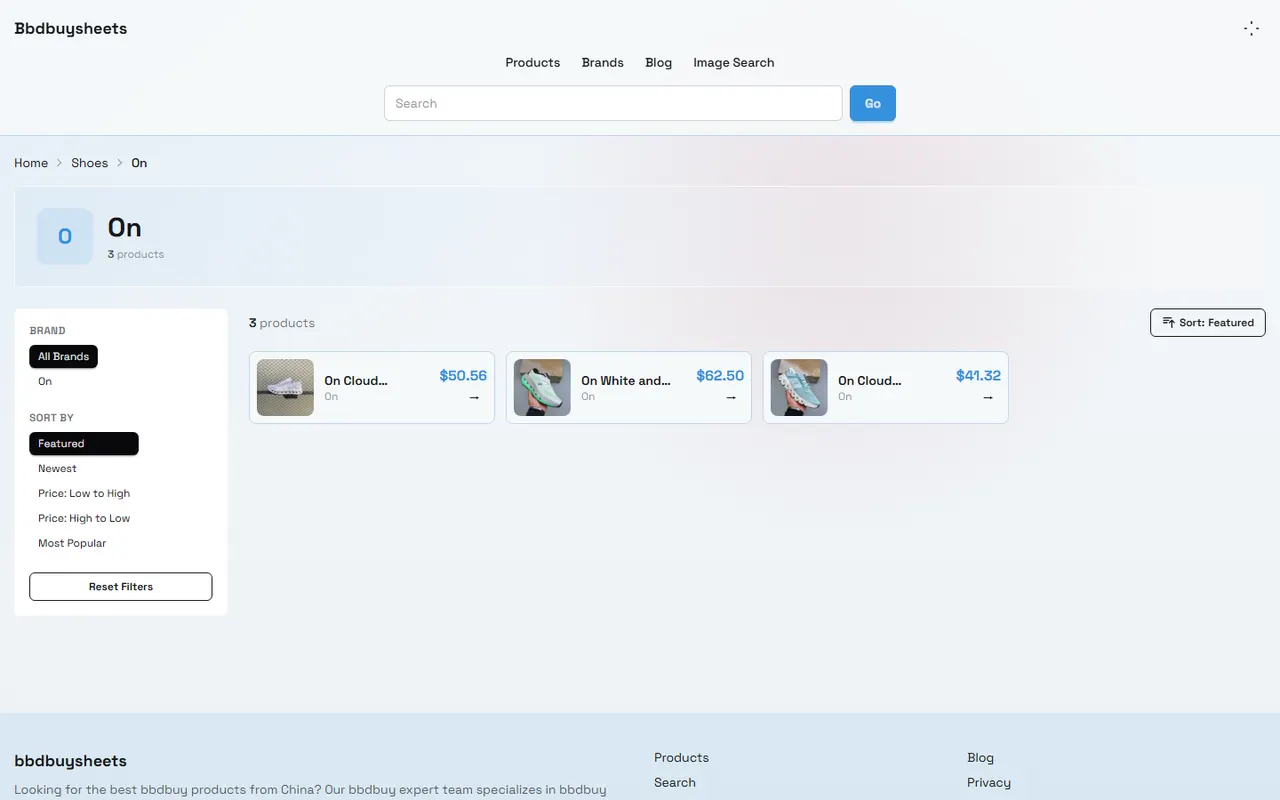
This catalog information is suitable for building a candidate list, but catalog cards cannot be directly equated with QC evidence. Product names, colors, prices, and card thumbnails can serve as index entry points; upper details, outsole wear, collar symmetry, or stitching issues should be based on zoomable product images or formal QC photos.
It is recommended to first complete the following actions in the spreadsheet:
Enter shoe-related categories and narrow down candidates using brand, sorting, and keywords.
Record the product name, brand, page price, and page date shown on the product card.
Assign a temporary number to each candidate, such as ON-001, ON-002, ON-003.
Open each candidate page to confirm that it is not an empty page, tag page, or a page with an unrecognizable product name.
Save the image source location on the product page, but do not mistake thumbnail quality for full QC image quality.
If the page lacks sufficient images to support defect review, set the status to "Pending Reshoot" rather than inferring shoe condition.
Prices, inventory, product information, and page status may change. When recording, include the verification date, currency, and page display conditions. Do not treat a single page reading as a long-term valid quote or inventory commitment.🔍
How to Set Up Image Numbering, Defect Type, and Notes Columns in Google Sheets
Google Sheets is more suitable for structured indexing with multiple candidates, multiple images, and multiple reviewers. It is recommended to have each row represent one image, not one pair of shoes. This way, when the same pair has multiple photos from different angles, the source and judgment for each can be recorded separately, avoiding mixing multiple issues in one notes cell.
Recommended fields are as follows:
Field | How to Fill In | Purpose |
|---|---|---|
Shoe ID | Unique number like ON-001 | Link product to image |
Image ID | Like ON-001-L-01 | Distinguish left/right shoe and shooting order |
Image Source | Product page, QC page, or reshoot | Track evidence origin |
Photographed Part | Left upper, right outsole, collar, etc. | Define inspection scope |
Visible Fact | e.g., "Light-colored stitching near laces on left upper" | Record only what is visible in the image |
Defect Type | Stain, loose thread, indentation, color difference, deformation, or uncategorized | Facilitate filtering and statistics |
Human Judgment | Acceptable, needs confirmation, or recommend exclusion | Express review opinions without posing as objective facts |
Evidence Limitation | Obstruction, glare, insufficient resolution, or missing angle | Prevent overinterpretation |
Status | Pending confirmation, pending reshoot, retained, excluded | Drive next steps |
Verification Date | YYYY-MM-DD | Mark timeliness |
Image IDs can use the format of "Shoe ID + left/right marker + sequence number". For example, ON-001-R-02 means the second image of the right shoe of ON-001. If the photo cannot confirm left or right, use a U marker and note "left/right unconfirmable" in the notes; do not guess based on toe direction.
Record Visible Evidence by Upper, Outsole, Collar, and Left-Right Symmetry
Image review for standing shoes should focus on visible parts, not directly infer wearing experience from appearance.
Upper inspection can record:
Obvious color inconsistency between left and right shoes;
Visible stains, damage, indentations, or delamination on mesh, leather, or overlays;
Missing or misaligned lace holes, laces, or decorative parts;
Visible deformation of toe box, side panels, or heel.
Outsole inspection can record:
Obvious notches or abnormal wear on outsole tread;
Visible height, color, or structural differences between left and right outsoles;
Excess glue, openings, or uneven adhesion on outsole edges;
Whether the image covers the complete outsole, not just a partial view.
Collar and heel inspection can record:
Obvious collapse or asymmetry in collar padding;
Tilted, wrinkled, or deformed heel counter;
Significant differences in collar height, opening shape, or lining exposure between left and right shoes.
Left-right symmetry can only describe appearance differences in photos, not prove that the two feet will definitely experience different forces when worn. Similarly, soft uppers, thick outsoles, or appearing padded collars cannot directly prove suitability for standing. For comfort, support, breathability, and durability, mark as "Cannot be confirmed from images alone" and record separately from image defects.🧾
Compare Operational Differences Between Website Cards and Sheets in Multi-Candidate Review
Website cards are suitable for quickly discovering candidates, while Google Sheets is suitable for continuous review and leaving judgment trails. The two serve different tasks, so do not directly copy marketing or appearance descriptions from cards as QC conclusions.
Comparison Item | Website Spreadsheet | Google Sheets |
|---|---|---|
Main Task | Browse categories, filter candidates, view product entry | Number images one by one, record defects, manage status |
Most Suitable Information | Product name, brand, price, category, and page images | Image facts, evidence limitations, human judgment, and reshoot requests |
Advantages | Quickly discover candidates, reduce initial screening time | Sortable, filterable, collaborative, and preserves review trail |
Limitations | May not provide complete QC angles or unified fields | Requires manual maintenance; prone to duplicate numbering or subjective descriptions |
Usage Boundary | Only treat page-visible information as page facts | Do not write human judgment as platform guarantees or physical test results |
A practical approach is to first build a candidate pool using the website spreadsheet, then transfer candidates that truly need review into Google Sheets. Do not copy all catalog products into the sheet, otherwise the table will be filled with candidates lacking sufficient evidence, reducing review efficiency.
Distinguish Image Facts, Human Judgment, and Unconfirmable Comfort
It is recommended to use a three-part expression in notes: first write image facts, then judgment, and finally limitations.
For example:
Image fact: A light crease is visible on the middle of the outer side of the right shoe.
Human judgment: Need to reshoot a side photo in natural light before deciding whether to retain.
Evidence limitation: The current image angle is too far to confirm whether the crease is surface reflection.
Do not write phrases like "right shoe quality is poor", "will definitely cause blisters when worn", or "suitable for long standing". These sentences either exceed what images can prove or present comfort and durability as verified facts.
If the page only provides product display images without separate QC photos, clearly mark as "Catalog image, not QC evidence". If images are cropped, obstructed, compressed, or too dark, also keep evidence limitations. If necessary, issue reshoot requests, for example:
Shoot left and right shoes separately from front, outer side, inner side, and heel;
Place outsole flat to ensure treads and edges are fully visible;
Use close-up photos for collar and heel;
Take close-ups of suspected stains, loose threads, or openings;
Keep original images, do not use filters to hide defects.
Establish Reshoot Request, Pending Confirmation, and Excluded Statuses
Status fields should use fixed values to avoid unscreenable free text like "look again", "might have issues", or "hold for now" for the same type of problem.
Recommended statuses are:
Pending Indexing: Candidate found, but image numbering not yet established.
Pending Reshoot: Candidate information exists, but key angles are missing or clarity insufficient.
Pending Confirmation: Visible anomaly found, but evidence insufficient to decide retain or exclude.
Retained: No obvious issues requiring exclusion found in current visible evidence, but comfort not verified.
Excluded: Based on clear image facts or page facts not meeting screening criteria, no longer entering next round of comparison.
Updated: Reshoot or new images added, awaiting re-review.
When excluding, write the reason clearly, e.g., "Continuous opening on outer outsole, visible in close-up" rather than just "poor quality". If page images are insufficient, use "Pending Reshoot" or "Pending Confirmation", not direct exclusion.
Final Action: Complete the Standing Shoe QC Image Index Sheet
You can complete a review in the following order:
Build a candidate pool from the relevant shoe category on bbdbuysheets.net.
Record product name, brand, page display price, currency, and verification date.
Assign a unique shoe ID to each candidate.
In Google Sheets, create rows per image and number left/right and photographed parts.
Fill in visible facts for upper, outsole, collar, heel, and left-right symmetry separately.
Record image facts, human judgment, and unconfirmable comfort separately.
Issue reshoot requests for candidates missing key angles.
Review status and only allow candidates with sufficient evidence to enter retain or exclude decisions.
Keep source, verification date, and evidence limitations in final notes.
This method mainly saves organization time, not promises a fixed amount. It is suitable for buyers who need to compare multiple candidate pairs and want to reduce the risk of missing defects, and for those who need to pass image evidence to another reviewer. The added cost is time for numbering, entry, and secondary checks; if there is only one pair and few images, creating a full table may not be as efficient as checking images one by one.
Do not force a "Retained" conclusion in the following situations: no photos of key parts, images cannot confirm left/right, page information has changed, images are clearly obstructed, or the user's actual concern is standing comfort rather than appearance defects. In such cases, a more prudent action is to reshoot, confirm with the platform, or keep the conclusion as "Cannot be confirmed".✅
Agent Platform Shopping FAQ
1. What steps should I take on bbdbuysheets.net if the product I received does not meet my expectations?
Reach out to your agent platform's customer support without delay. Most items from Chinese sellers that are not specialty goods include a 5-day unconditional return and exchange policy. If you are unhappy, you may ask for a return. When the package has already been shipped from the warehouse to your location and you find a quality problem, get in touch with the agent platform's support team so they can contact the merchant on your behalf to discuss compensation.
Email addresses for customer service by platform:
kakobuy: [email protected]
oopbuy: [email protected]
usfans: [email protected]
hipobuy: [email protected]
superbuy: [email protected]
2. On bbdbuysheets.net, which platform provides the most cost-effective coupons?
Kakobuy is suggested because it presently gives a $15 discount code with no minimum spending requirement. This suits those ordering smaller parcels well. The promo code is kakobuy888.
3. What should first-time users of an agent platform accessed through bbdbuysheets.net pay attention to?
Users who access a Taobao agent via a spreadsheet for the first time generally receive a new-user shipping discount package. Also, review the step-by-step shopping tutorial for beginners.
4. What kinds of products can be found on bbdbuysheets.net?
The site covers a wide assortment of categories: shoes, T-shirts, sweaters, hoodies, jeans, sweatpants, shorts, beach shorts, factory clearance goods, down jackets, baseball jerseys, shirts, hats, jewelry, bags, electronics, sunglasses, socks, underwear, and fashionable collectibles.
5. How do I review quality inspection photos on bbdbuysheets.net?
When looking at QC photos, pay attention to the specific characteristics of the product you bought. For shoes, check several important areas like the toe, heel, and tongue to assess stitching, shape, and tongue thickness to determine if it is a well-made pair. For clothing, examine the collar label, logo embroidery, fabric, and the neatness of collar and cuffs, among other details.
Browse our latest products and find your next favorite item.